Just a small project idea for in case anybody is bored: write a small web toy that generates random blog entries in the style of a given blog.
My mental image would be basically to have a form in which the user can paste a URL. What the user should get back is a formatted blog post (maybe even using the right templates), and also html code that they can paste back into their own blogs.
You'll also want to figure out how to retrieve the individual blog posts, perhaps by using a feed-discovery mechanism. The result should be a single post with title, text and maybe even comments. Haskellers, especially newbies, might be particularly interested because it'll give you a chance with the Haskell XML stuff for parsing the RSS, PFP (for the text generation?) and HApps (for the web front-end). Many of the pieces are there. I remember seeing an RSS parser and a random text generator floating about, so it might just be a matter of cobbling things together.
If you're sucessful, you might even kick off one of those memes where people dada their own blogs as a post.
2007-03-31

2007-02-02
reading and writing UTF-8 in Haskell
We were discussing on the Haskell fr what it would take to work with UTF-8. Here is an example I cobbled together. Do whatever you want; it's going in the public domain. Note that I've also posted it to the wiki, so please make corrections there if you can.
Note that I don't really know what the best practices are wrt to reading and writing UTF-8, but here's what works for me.
We're going to be using the 2002 UTF-8 implementation by Sven Moritz Hallberg. I don't know if this is the best one, but it's what darcs uses. (I do wonder though, if it's worth turning it into a little library, something like Data.Char.UTF8)
We perform the demonstration on a list of files, specified as command line arguments. What we want to show is that we can both read and write UTF-8, so the demonstration will be of reading a file in, reverse every one of its lines, and writing it back out with the extension '.reversed'
For this to work, we need to have some helper functions for reading and writing [Word8]. I don't know if this is the right way to go about it.
Note that I don't really know what the best practices are wrt to reading and writing UTF-8, but here's what works for me.
> module Main where

> import Control.Monad (mapM_)
> import Data.Word (Word8)
> import Foreign.Marshal.Array (allocaArray, peekArray, pokeArray)
> import System.Environment (getArgs)
> import System.IO (hFileSize, Handle, hGetBuf, hPutBuf, openBinaryFile,
>                   IOMode(ReadMode, WriteMode))
We're going to be using the 2002 UTF-8 implementation by Sven Moritz Hallberg. I don't know if this is the best one, but it's what darcs uses. (I do wonder though, if it's worth turning it into a little library, something like Data.Char.UTF8)
> import UTF8
We perform the demonstration on a list of files, specified as command line arguments. What we want to show is that we can both read and write UTF-8, so the demonstration will be of reading a file in, reverse every one of its lines, and writing it back out with the extension '.reversed'
> main :: IO ()
> main =
>  do args <- getArgs
>     mapM_ reverseUTF8File args

> reverseUTF8File :: FilePath -> IO ()
> reverseUTF8File f =
>   do fb <- readFileBytes f
>      case decode fb of
>        (cs, []) -> writeFileBytes (f ++ ".reverse") $ encode $ reverseLines cs
>        (_,  xs) -> fail $ show xs
>   where
>     reverseLines = unlines . map reverse . lines
For this to work, we need to have some helper functions for reading and writing [Word8]. I don't know if this is the right way to go about it.
> readFileBytes :: FilePath -> IO [Word8]
> readFileBytes f =
>   do h <- openBinaryFile f ReadMode
>      hsize <- fromIntegral `fmap` hFileSize h
>      hGetBytes h hsize
>
> writeFileBytes :: FilePath -> [Word8] -> IO ()
> writeFileBytes f ws =
>  do h <- openBinaryFile f WriteMode
>     hPutBytes h (length ws) ws

> hGetBytes :: Handle -> Int -> IO [Word8]
> hGetBytes h c = allocaArray c $ \p ->
>                   do c' <- hGetBuf h p c
>                      peekArray c' p
>
> hPutBytes :: Handle -> Int -> [Word8] -> IO ()
> hPutBytes h c ws = allocaArray c $ \p ->
>                      do pokeArray p ws
>                         hPutBuf h p c
2007-01-31
think of a monad...
Think of a monad as a spacesuite full of nuclear waste in the ocean next to a container of apples. now, you can't put oranges in the space suite or the nucelar waste falls in the ocean, *but* the apples are carried around anyway, and you just take what you need. - Dons
Thought an illustration might be useful:
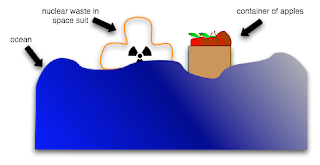
(Yes, yes, I know I have better things to be doing with my time)
Thought an illustration might be useful:

(Yes, yes, I know I have better things to be doing with my time)
2007-01-17
yaht latex now up to date with wiki
YAHT has two versions: a LaTeX one, which produces a nice PDF including margin notes, an index, etc; and a wiki(book) one, which provides an HTML view and instant editing.
The latex (darcs) version was lagging a bit behind the wiki one for a while, but it has now caught up. I'm quite pleased with the results. I have received 3 darcs patches so far, which may not be huge, but is still better than nothing. More importantly, I have observed that people still like going to the PDF version a lot, so we know that keeping that up to date is important. Having YAHT on the wiki has certainly been useful as well. In the two and half months since its wikification, you have not only corrected countless crappy-script-induced-deformations, over a dozen factual errors, and twice as many typos or spelling/grammatical errors. Good work, Haskellers!
Note also that keeping the LaTeX version up to date should now be a lot easier, thanks to (1) a cleaned up and less noisy conversion script (2) stupid darcs tricks. I've got three branches: the (noisy) auto-convered version (latex-to-darcs), a "production" version, which has less noise than the prior, and an MVS version, which pulls in changes from the wiki. The noisy version has some gunk from my scripts that I just have to revert. The MVS version has some changes which only affect noise (errors in where I put my
The latex (darcs) version was lagging a bit behind the wiki one for a while, but it has now caught up. I'm quite pleased with the results. I have received 3 darcs patches so far, which may not be huge, but is still better than nothing. More importantly, I have observed that people still like going to the PDF version a lot, so we know that keeping that up to date is important. Having YAHT on the wiki has certainly been useful as well. In the two and half months since its wikification, you have not only corrected countless crappy-script-induced-deformations, over a dozen factual errors, and twice as many typos or spelling/grammatical errors. Good work, Haskellers!
Note also that keeping the LaTeX version up to date should now be a lot easier, thanks to (1) a cleaned up and less noisy conversion script (2) stupid darcs tricks. I've got three branches: the (noisy) auto-convered version (latex-to-darcs), a "production" version, which has less noise than the prior, and an MVS version, which pulls in changes from the wiki. The noisy version has some gunk from my scripts that I just have to revert. The MVS version has some changes which only affect noise (errors in where I put my
2007-01-16
House runs under Parallels
House is an operating system written in Haskell. Ever since CSE380 (titled "Operating Systems") and my many many segfaults, I have deeply impressed with those I call "people who know how computers work". So whenever somebody says "I wrote an operating system!"... I simply marvel.
Anyway, was just sort of fiddling with my computer trying to see if I can get it to run, but I was having the toughest time! The thing boots fine under Q (the qemu front end), but nothing I did could make it work on Parallels. Tried renaming it with .hdd extension, but then I just got a grub prompt with no idea how to proceed. Renaming it to .fdd and connecting it as a floppy wouldn't work, so my first reaction was "oh! it must be some kind of crazy Parallels-specific format", so I kept searching the web and asking on IRC, trying to see if anyone know how to produce Parallels-compatible bootable floppy images...
Well you know what the problem was?
Next to the floppy drive icon [connected to hOp-0.8.fdd] are two checkboxes, Enabled and Connect on Startup. Connect on Startup was unchecked.
Yes eric, you have to put the disk in the drive for it to work... good job!
What a dolt.
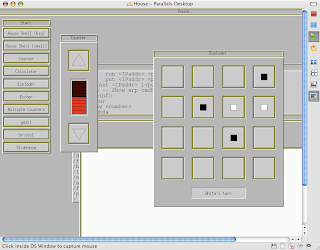
And the second is of the whole desktop (probably a little gratuitous):
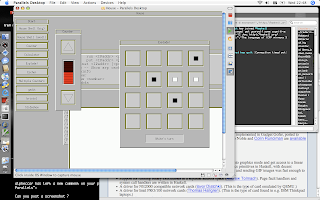
If you're having trouble getting this to work on your machine:
Parallels might crash the first two times you do this. I have no idea why, but it seems to work after that.
Anyway, was just sort of fiddling with my computer trying to see if I can get it to run, but I was having the toughest time! The thing boots fine under Q (the qemu front end), but nothing I did could make it work on Parallels. Tried renaming it with .hdd extension, but then I just got a grub prompt with no idea how to proceed. Renaming it to .fdd and connecting it as a floppy wouldn't work, so my first reaction was "oh! it must be some kind of crazy Parallels-specific format", so I kept searching the web and asking on IRC, trying to see if anyone know how to produce Parallels-compatible bootable floppy images...
Well you know what the problem was?
Next to the floppy drive icon [connected to hOp-0.8.fdd] are two checkboxes, Enabled and Connect on Startup. Connect on Startup was unchecked.
Yes eric, you have to put the disk in the drive for it to work... good job!
What a dolt.
Edit 2006-01-17
Here are a couple of screenshots, as requested. The first is just the Parallels window:
And the second is of the whole desktop (probably a little gratuitous):

If you're having trouble getting this to work on your machine:
- Rename hOp-0.8.flp to hOp-0.8.fdd
- Add it as the floppy disk drive to your virtual machine
- Set the boot sequence to start with the floppy (or at least, have the floppy somewhere)
- Remember to click that Connect on Setup button next to the floppy config
Parallels might crash the first two times you do this. I have no idea why, but it seems to work after that.
2007-01-07
nous sommes huit (#haskell.fr)
Le nombre d'utilisateurs sur #haskell.fr (irc.freenode.net) a encore doublé. On est 8, maintenant, 8 êtres humains. Je vais noter chaque passage à 2X jusqu'à 32. J'imagine que à partir de cette taille, le channel n'aura plus besoin d'encouragement.
Ick. Eric-French is scary. There's now 8 of us in #haskell.fr (or rather, 8 max) and that's bona fide human beings too. I'm going to note each of these doublings until there's 32 of us. At that point, I figure that we're not going to need anybody blowing on the fire.
Francophone Haskeller? Come on in! And stick around; just put it in your automated login. If #haskell is too busy for you, consider maybe #haskell.fr as a quieter alternative. We want newbies, experts and curious hangers-on alike. It would be especially good if experienced Haskellers hung around, because newbies really should not be taking advice from yellow-belt Eric. Oh, and unless they kick me out, non-native speakers bienvenues.
Ick. Eric-French is scary. There's now 8 of us in #haskell.fr (or rather, 8 max) and that's bona fide human beings too. I'm going to note each of these doublings until there's 32 of us. At that point, I figure that we're not going to need anybody blowing on the fire.
Francophone Haskeller? Come on in! And stick around; just put it in your automated login. If #haskell is too busy for you, consider maybe #haskell.fr as a quieter alternative. We want newbies, experts and curious hangers-on alike. It would be especially good if experienced Haskellers hung around, because newbies really should not be taking advice from yellow-belt Eric. Oh, and unless they kick me out, non-native speakers bienvenues.
2007-01-06
haskell wikibook print version
Just a quick note to mention that the wikibook's print edition is now automatically generated by a script. 90ish lines of what I hope to be reasonable-looking Haskell code. It should make it easier to keep that print version synched up.
Subscribe to:
Posts (Atom)
